
Complete Manual for Automatic Documents Collection
Estimated time: 30-45 minutes for complete configuration
What will you learn from this manual?
The manual will teach you how to implement and use the web component @ jaak.ai / stamps for automated capture of ID from scratch. No advanced technical skills required - Just follow the steps.
Vivo demand
Before you start with implementation, you can test the functioning component:
What can you do about the demo?
- Test document capture (front and back)
- See automatic document detection
- Check compatibility with your device
- Understand complete flow before applying
Before Start - Checks list
Be sure to have these elements ready:
- Node.js 16.0 + installed (for npm projects)
- Modern navigation (Chrome 67 +, Firefox 63 +, Safari 12 +)
- HTTPS connection (required for camera access)
- Code Editor
- Access to functional web camera
- Test ID
Contents Index
| Section | What will you do? | Time |
|---|---|---|
| Step 1 | Install and configure component | 5 min |
| Step 2 | Basic HTML implementation | 15 min |
| Step 3 | Configure events and responses | 10 min |
| Step 4 | Implement into frameworks | 10 min |
| Step 5 | Test document capture | 5 min |
Step 1: Install and Configure component
Objective
Install the component @ jaak.ai / stamps and configure the environment.
Installation methods
1.1 Installation using NPM (Recommended)
npm install @jaak.ai/stamps@2.0.0
1.2 Installation using CDN
<script type="module" src="https://unpkg.com/@jaak.ai/stamps@2.0.0/dist/jaak-stamps-webcomponent/jaak-stamps-webcomponent.esm.js"></script>
1.3 Technical requirements
| Requirement | Version | Mandatory? |
|---|---|---|
| Navigation | Chrome 67 +, Firefox 63 +, Safari 12 + | Yes |
| HTTPS | Safe protocol | Yes (production) |
| JavaScript | ES2017 + | Yes |
| RAM | 4GB + recommended | No (better performance) |
Step 2: Basic HTML implementation
Objective
Create your first functional implementation for document capture.
2.1 HTML Funcional complete
<!DOCTYPE html>
<html dir="ltr" lang="es">
<head>
    <meta charset="utf-8">
    <meta name="viewport" content="width=device-width, initial-scale=1.0">
    <title>JAAK Stamps - Captura de Documentos</title>

    <script type="module" src="https://unpkg.com/@jaak.ai/stamps@2.0.0/dist/jaak-stamps-webcomponent/jaak-stamps-webcomponent.esm.js"></script>
</head>
<body>
    <div class="container">
        <h1>Captura de Documentos JAAK Stamps</h1>
        <p>Componente de captura automatizada de documentos de identidad</p>

        <div class="status" id="statusDiv">
            <strong>Estado:</strong> <span id="statusText">Inicializando...</span>
        </div>

        <div class="controls">
            <button id="preloadBtn" disabled>Precargar Modelos</button>
            <button id="startBtn" disabled>Iniciar Captura</button>
            <button id="resetBtn" disabled>Reiniciar</button>
            <button id="getImagesBtn" disabled>Obtener Imágenes</button>
        </div>

        <jaak-stamps
            id="documentCapture"
            debug="false"
            mask-size="90"
            alignment-tolerance="15"
            crop-margin="20"
            capture-delay="1500"
            preferred-camera="auto"
            use-document-classification="false">
        </jaak-stamps>

        <div id="results" class="results" style="display: none;">
            <h3>Documentos Capturados</h3>
            <div id="captureData"></div>
        </div>
    </div>

    <script>
        // Variables globales
        let jaakStamps = null;
        let isComponentReady = false;
        let modelsPreloaded = false;

        // Initiate component correctly
        async function initializeJaakStamps() {
            await customElements.whenDefined('jaak-stamps');
            jaakStamps = document.getElementById('documentCapture');

            // Event listeners principales
            jaakStamps.addEventListener('isReady', handleComponentReady);
            jaakStamps.addEventListener('captureCompleted', handleCaptureCompleted);
            jaakStamps.addEventListener('error', handleError);
            jaakStamps.addEventListener('modelsLoaded', handleModelsLoaded);
        }

        function handleComponentReady(event) {
            isComponentReady = event.detail;
        }

        function handleModelsLoaded(event) {
            modelsPreloaded = true;
        }

        function handleCaptureCompleted(event) {
            const images = event.detail;
            displayResults(images);
        }

        function handleError(event) {
            console.error('component error:', event.detail);
        }

        async function handlePreload() {
            const result = await jaakStamps.preloadModel();
            if (result.success) modelsPreloaded = true;
        }

        async function handleStart() {
            await jaakStamps.startCapture();
        }

        async function handleReset() {
            await jaakStamps.resetCapture();
        }

        async function handleGetImages() {
            const isCompleted = await jaakStamps.isProcessCompleted();
            if (isCompleted) {
                const images = await jaakStamps.getCapturedImages();
                displayResults(images);
            }
        }

        function displayResults(images) {
            // Surrender images caught in DOM (use DOM) API )
            const resultsDiv = document.getElementById('results');
            const captureDataDiv = document.getElementById('captureData');
            // ... build nodes with creatElement / appendChild
            resultsDiv.style.display = 'block';
        }

        window.addEventListener('load', initializeJaakStamps);
    </script>
</body>
</html>
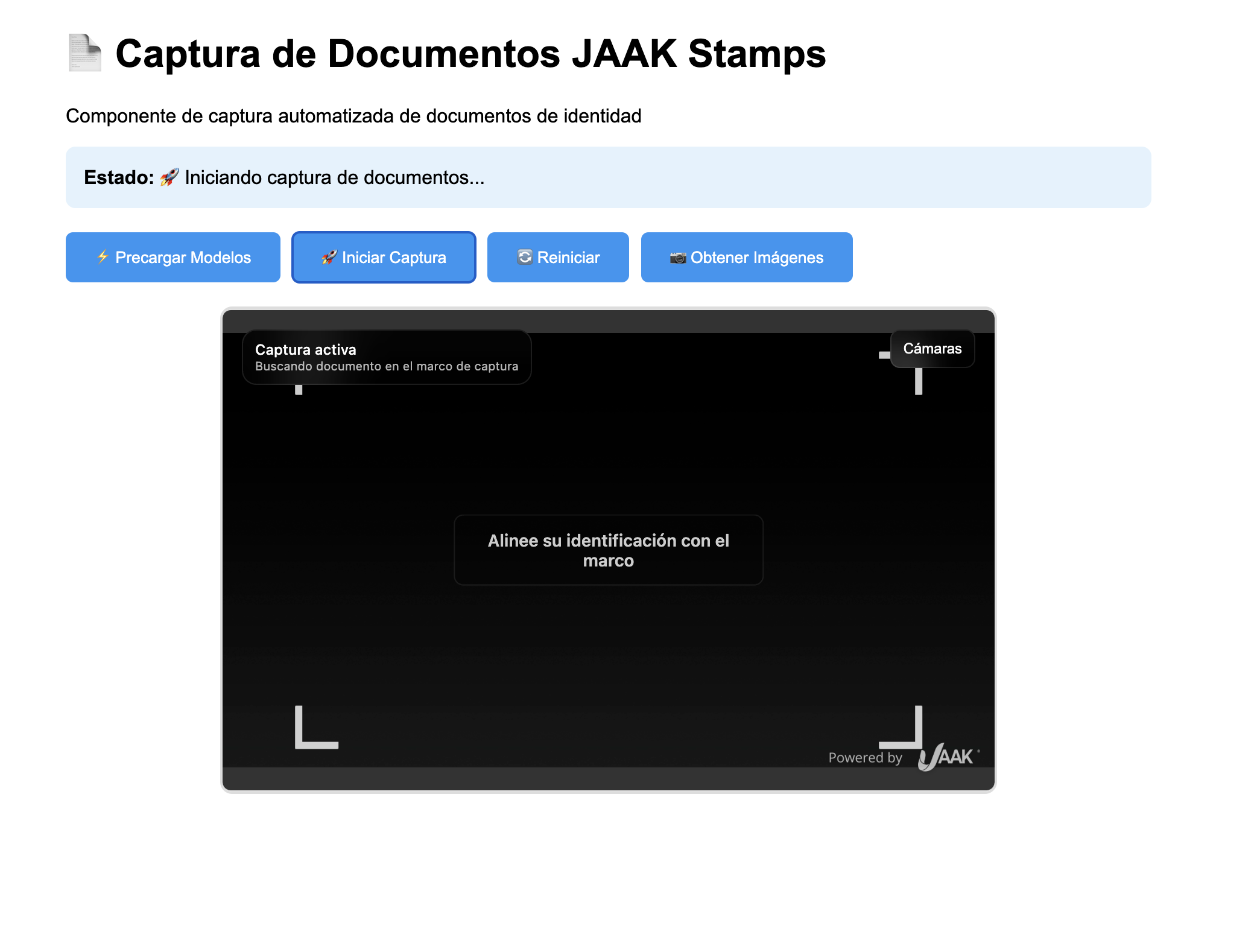
When renderizing you have to have an HTML page as follows:
2.2 Properties of the component
| Property | Type | Value by Deffect | Description | Example |
|---|---|---|---|---|
| debug | boolean | false | Enabling detailed login | debug="true" |
| mask-size | number | 90 | Detection mask size (%) | mask-size="85" |
| alignment-tolerance | number | 15 | Linkage tolerance (pixels) | alignment-tolerance="10" |
| crop-margin | number | 20 | Filling mark (pixels) | crop-margin="25" |
| Captain | number | 1500 | Delay before capture (ms) | capture-delay="2000" |
| preferred | string | "auto" | Camera Preference | preferred-camera="front" |
| use-document-classification | boolean | false | Automatic document classification | use-document-classification="true" |
Step 3: Configure Events and Responses
Objective
Configure events correctly to manage document capture.
Events Available
3.1 Main events
| Event | When to shoot | The event details | Example of use |
|---|---|---|---|
| isReady | ready to use component | boolean | Enabling controls |
| modelsLoaded | Loaded AI models | object | Allow capture |
| completed | Capture completed | {front, back, metadata} | Show results |
| error | Test error | {message, code?} | Show bug |
3.2 Implementation of Event Listeners
// Obtain reference to component
const jaakStamps = document.getElementById('documentCapture');

// Configurar eventos principales
jaakStamps.addEventListener('isReady', (event) => {
    console.log('Retiring component:', event.detail);
    enableBasicControls(event.detail);
});

jaakStamps.addEventListener('modelsLoaded', (event) => {
    console.log('Modelos cargados:', event.detail);
    enableCaptureControls();
});

jaakStamps.addEventListener('captureCompleted', (event) => {
    console.log('Capture completed:', event.detail);
    processCapturedDocuments(event.detail);
});

jaakStamps.addEventListener('error', (event) => {
    console.error('Error:', event.detail);
    handleCaptureError(event.detail);
});
3.3 Response Data Structure
// Example of data received from 'CaptureCompleted'
{
    front: {
        fullFrame: "data:image/jpeg;base64,/9j/4AAQSkZJRgABAQAAAQ...", // Full image
        croppedDocument: "data:image/jpeg;base64,/9j/4AAQSkZJRgABAQAAAQ...", // Closed document
        confidence: 0.95,
        detectionBox: { x: 100, y: 50, width: 400, height: 250 }
    },
    back: {
        fullFrame: "data:image/jpeg;base64,/9j/4AAQSkZJRgABAQAAAQ...",
        croppedDocument: "data:image/jpeg;base64,/9j/4AAQSkZJRgABAQAAAQ...",
        confidence: 0.92,
        detectionBox: { x: 110, y: 55, width: 390, height: 245 }
    },
    metadata: {
        documentsProcessed: 2,
        processingTime: 3245,
        averageConfidence: 0.935,
        timestamp: 1645123456789
    }
}
Step 4: Implement with Frameworks
React
import React, { useRef, useEffect, useState } from 'react';
import { defineCustomElements } from '@jaak.ai/stamps/loader';

defineCustomElements();

const DocumentCapture = () => {
    const jaakStampsRef = useRef(null);
    const [isReady, setIsReady] = useState(false);
    const [modelsLoaded, setModelsLoaded] = useState(false);
    const [capturedImages, setCapturedImages] = useState(null);
    const [error, setError] = useState(null);

    useEffect(() => {
        const initComponent = async () => {
            await customElements.whenDefined('jaak-stamps');
            const component = jaakStampsRef.current;

            component.addEventListener('isReady', (event) => setIsReady(event.detail));
            component.addEventListener('modelsLoaded', () => setModelsLoaded(true));
            component.addEventListener('captureCompleted', (event) => setCapturedImages(event.detail));
            component.addEventListener('error', (event) => setError(event.detail));
        };

        initComponent();
    }, []);

    const handlePreload = async () => {
        try {
            setError(null);
            const result = await jaakStampsRef.current.preloadModel();
            if (!result.success) setError({ message: result.error });
        } catch (err) {
            setError(err);
        }
    };

    const handleStartCapture = async () => {
        try {
            setError(null);
            await jaakStampsRef.current.startCapture();
        } catch (err) {
            setError(err);
        }
    };

    return (
        <div className="document-capture-container">
            <h2>Captura de Documentos React</h2>

            <div className={`status ${error ? 'error' : isReady ? 'success' : 'info'}`}>
                {error ? `Error: ${error.message}` :
                 modelsLoaded ? 'Listo para capturar' :
                 isReady ? 'Cargando modelos...' : 'Inicializando...'}
            </div>

            <div className="controls">
                <button onClick={handlePreload} disabled={!isReady || modelsLoaded}>
                    Precargar Modelos
                </button>
                <button onClick={handleStartCapture} disabled={!isReady || !modelsLoaded}>
                    Iniciar Captura
                </button>
            </div>

            <jaak-stamps
                ref={jaakStampsRef}
                debug="false"
                mask-size="90"
                alignment-tolerance="15"
                capture-delay="1500"
                preferred-camera="auto">
            </jaak-stamps>

            {capturedImages && (
                <div className="results">
                    <h3>Documentos Capturados</h3>
                    <div className="document-images">
                        {capturedImages.front && (
                            <div>
                                <h4>Frente</h4>
                                <img src={capturedImages.front.fullFrame} alt="Document before" />
                            </div>
                        )}
                        {capturedImages.back && (
                            <div>
                                <h4>Reverso</h4>
                                <img src={capturedImages.back.fullFrame} alt="Reverse document" />
                            </div>
                        )}
                    </div>
                </div>
            )}
        </div>
    );
};

export default DocumentCapture;
Angular
// document-capture.component.ts
import { Component, ElementRef, ViewChild, AfterViewInit } from '@angular/core';
import { defineCustomElements } from '@jaak.ai/stamps/loader';

defineCustomElements();

@Component({
    selector: 'app-document-capture',
    template: `
        <div class="document-capture-container">
            <h2>Captura de Documentos Angular</h2>

            <div class="status">
                <span *ngIf="error">Error: {{ error.message }}</span>
                <span *ngIf="! & isReady & motilsLoaded error">Listo para capturar</span>
                <span *ngIf="! error & & isReady & &! modeling">Cargando modelos...</span>
                <span *ngIf="!">Inicializando...</span>
            </div>

            <div class="controls">
                <button (click)="preloadModels()" [disabled]="!isReady || modelsLoaded">
                    Precargar Modelos
                </button>
                <button (click)="startCapture()" [disabled]="!isReady || !modelsLoaded">
                    Iniciar Captura
                </button>
            </div>

            <jaak-stamps
                #jaakStamps
                debug="false"
                mask-size="90"
                alignment-tolerance="15"
                capture-delay="1500"
                preferred-camera="auto">
            </jaak-stamps>

            <div *ngIf="capturedImages" class="results">
                <h3>Documentos Capturados</h3>
                <div class="document-images">
                    <div *ngIf="capturedImages.front">
                        <h4>Frente</h4>
                        <img [src]="capturedImages.front.fullFrame" alt="Document before">
                    </div>
                    <div *ngIf="capturedImages.back">
                        <h4>Reverso</h4>
                        <img [src]="capturedImages.back.fullFrame" alt="Reverse document">
                    </div>
                </div>
            </div>
        </div>
    `,
    schemas: [CUSTOM_ELEMENTS_SCHEMA]
})
export class DocumentCaptureComponent implements AfterViewInit {
    @ViewChild('jaakStamps') jaakStamps!: ElementRef;

    isReady = false;
    modelsLoaded = false;
    capturedImages: any = null;
    error: any = null;

    async ngAfterViewInit() {
        await customElements.whenDefined('jaak-stamps');
        const component = this.jaakStamps.nativeElement;

        component.addEventListener('isReady', (event: any) => this.isReady = event.detail);
        component.addEventListener('modelsLoaded', () => this.modelsLoaded = true);
        component.addEventListener('captureCompleted', (event: any) => this.capturedImages = event.detail);
        component.addEventListener('error', (event: any) => this.error = event.detail);
    }

    async preloadModels() {
        try {
            this.error = null;
            const result = await this.jaakStamps.nativeElement.preloadModel();
            if (!result.success) this.error = { message: result.error };
        } catch (error) {
            this.error = error;
        }
    }

    async startCapture() {
        try {
            this.error = null;
            await this.jaakStamps.nativeElement.startCapture();
        } catch (error) {
            this.error = error;
        }
    }
}
Step 5: Test document capture
Objective
Configure a local server with HTTPS to test the capture component correctly as browsers require HTTPS to access the camera.
Methods to Lift Local Server
5.1 Option 1: Simple HTTP Server with Python (For development)
# Si tienes Python 3 instalado
python -m http.server 8000

# Or Python 2
python -m SimpleHTTPServer 8000
Then get to: http://localhost:8000
Important
This option works only at localhost for development. To production you require HTTPS.
5.2 Option 2: HTTPS with Live Server (VS Code)
- Install Live Server extension in VS Code
- Configure HTTPS at settings.json:
{
    "liveServer.settings.https": {
        "enable": true,
        "cert": "",
        "key": "",
        "passphrase": ""
    }
}
- Right click on HTML file, select "Open with Live Server"
5.3 Option 3: HTTPS server with http-server (Node.js)
# Instalar http-server globalmente
npm install -g http-server

# Generate autosigned certificates (development only)
openssl req -newkey rsa:2048 -new -nodes -x509 -days 3650 -keyout key.pem -out cert.pem

# Levantar servidor HTTPS
http-server -S -C cert.pem -K key.pem -p 8443

# Acceder a: https://localhost:8443
5.4 Option 4: Vite Server (Recommended)
# Create basic package.json
npm init -y

# Instalar Vite
npm install --save-dev vite

# Ejecutar servidor
npm run dev
checklist
| Element | State | Description |
|---|---|---|
| HTTPS Server | ☐ | Server running with SSL certificate |
| Loading component | ☐ | Element appears in DOM |
| Models are preloaded | ☐ | A models are downloaded |
| Detection of documents | ☐ | Detects document automatically |
| Front / back capture | ☐ | Capture both sides of document |
| Images are generated | ☐ | Returns images at base64 |
Test process
Step 1: Prepare file
- Copy full HTML code from step 2 into a called file
index.html - Keep it in an empty folder
Step 2: Lift server
- Open terminal in folder where you saved
index.html - Implement one of the above methods
- Accept autosigned certificate if safety warning appears
Step 3: Prepare document
- Have an ID ready (INE, passport, license)
- Good light at the capture area
- Flat surface to place document
Step 4: Test Capture
- Recharging models by clicking "Recharging Models"
- Start capture with "Start Capture" button
- Position document within the detection framework
- To expect automatic capture of the document front
- Filling document at request
- To expect automatic capture of the back
- Check results in the captured images Section
Validate Quality
| What's his face? | What to check? | State |
|---|---|---|
| Nitdez | Legible text in images | ☐ |
| Linkage | A focused and straight document | ☐ |
| Lighting | Without shadows or reflections | ☐ |
| Completion | Visible complete document | ☐ |
| Resolution | High quality images | ☐ |
Common Problem Resolution
Common challenges and solutions
Error: "Models don't load up"
| Possible Cause | Resolution |
|---|---|
| Slow connection | Wait more time or improve connection |
| Active advertising block | Unabling blockers for the site |
| Insufficient report | Close other tabs / applications |
| Corrupt cache | Clean browser cache |
Error: "document isn't detected"
// Detection debugging
function debugDocumentDetection() {
    const jaakStamps = document.querySelector('jaak-stamps');

    console.log('Current configuration:', {
        maskSize: jaakStamps.getAttribute('mask-size'),
        alignmentTolerance: jaakStamps.getAttribute('alignment-tolerance'),
        debug: jaakStamps.getAttribute('debug')
    });

    jaakStamps.setAttribute('debug', 'true');
}
Solutions:
- To improve light: using light or light
- Adjust tolerance: increase
alignment-tolerancea 20-25 - Check size: reduce
mask-sizea 80-85 - Clean camera: Clean camera lens
- Test another browser: Chrome works best
Error: "Very slow process"
| Problem | Diagnosis | Resolution |
|---|---|---|
| Models are downloaded at once | Do not be precharged | Use preloadModel() |
| Slow device | Limited CPU / RAM | Close other applications |
| A very high resolution | 4K / HD camera | Reduce camera resolution |
| Slow net | Low bandwidth | Use faster connection |
Full reference
Public methods
| Method | Parameters | Return | Description | Example |
|---|---|---|---|---|
| model () | Void | Promise<{success, error?}> | Recharging AI models | await jaakStamps.preloadModel() |
| stardature () | Void | Promise<void> | Begins capture process | await jaakStamps.startCapture() |
| resetCapture () | Void | Promise<void> | Reboot process | await jaakStamps.resetCapture() |
| getCaptureImages () | Void | Promise<{front, back, metadata}> | He gets captured images | await jaakStamps.getCapturedImages() |
| isProcessCompleted () | Void | Promise<boolean> | Check if the process's over | await jaakStamps.isProcessCompleted() |
Complete Events
| Event | Data (event.details) | When to shoot |
|---|---|---|
| isReady | boolean | ready to use component |
| modelsLoaded | {success: boolean, loadTime?: number} | Loaded AI models |
| completed | {front, back, metadata} | Capture from both sides completed |
| documented | {side: 'front'|'back', confidence: number} | Fame document |
| CaptureProgress | {step: string, progress: number} | Progress of the process |
| error | {message: string, code?: string} | Error in any operation |
Advanced Properties
| Property | Type | Range | Description | Recommendation |
|---|---|---|---|---|
| mask-size | number | 50-100 | Detection area size (%) | 85-95 for documents |
| alignment-tolerance | number | 5-30 | alignment tolerance (px) | 10-20 for precision |
| crop-margin | number | 10-50 | Filling mark (px) | Standard 20-30 |
| Captain | number | 500-5000 | Delay before capture (ms) | 1500-2000 for stability |
Advanced Setup
Visual Personalization
/* Personalizar la apariencia del componente */
jaak-stamps {
    --primary-color: #2196f3;
    --secondary-color: #ffffff;
    --success-color: #4caf50;
    --error-color: #f44336;
    --detection-frame-color: #2196f3;
    --background-overlay: rgba(0,0,0,0.7);
}

/* Personalizar el marco de detección */
jaak-stamps::part(detection-frame) {
    border: 3px solid var(--detection-frame-color);
    border-radius: 12px;
    box-shadow: 0 0 20px rgba(33, 150, 243, 0.3);
}

/* Personalizar instrucciones */
jaak-stamps::part(instructions) {
    background: var(--primary-color);
    color: var(--secondary-color);
    border-radius: 8px;
    padding: 15px;
    font-size: 16px;
}
Programme Setup
// Advanced configuration using JavaScript
const jaakStamps = document.querySelector('jaak-stamps');

async function setupAdvancedConfig() {
    const isMobile = /Android|iPhone|iPad/.test(navigator.userAgent);

    if (isMobile) {
        jaakStamps.setAttribute('mask-size', '85');
        jaakStamps.setAttribute('capture-delay', '2000');
        jaakStamps.setAttribute('alignment-tolerance', '20');
    } else {
        jaakStamps.setAttribute('mask-size', '90');
        jaakStamps.setAttribute('capture-delay', '1500');
        jaakStamps.setAttribute('alignment-tolerance', '15');
    }
}

function adjustForNetworkSpeed() {
    if (navigator.connection) {
        const effectiveType = navigator.connection.effectiveType;
        if (effectiveType === 'slow-2g' || effectiveType === '2g') {
            jaakStamps.setAttribute('mask-size', '80');
            jaakStamps.setAttribute('crop-margin', '15');
        }
    }
}
Advanced Use Cases
Backend integration
// Automatic sending to server after capture
jaakStamps.addEventListener('captureCompleted', async (event) => {
    const images = event.detail;

    try {
        const formData = new FormData();

        if (images.front) {
            const frontBlob = dataURLtoBlob(images.front.fullFrame);
            formData.append('documentFront', frontBlob, 'document_front.jpg');

            if (images.front.croppedDocument) {
                const frontCroppedBlob = dataURLtoBlob(images.front.croppedDocument);
                formData.append('documentFrontCropped', frontCroppedBlob, 'document_front_cropped.jpg');
            }
        }

        if (images.back) {
            const backBlob = dataURLtoBlob(images.back.fullFrame);
            formData.append('documentBack', backBlob, 'document_back.jpg');

            if (images.back.croppedDocument) {
                const backCroppedBlob = dataURLtoBlob(images.back.croppedDocument);
                formData.append('documentBackCropped', backCroppedBlob, 'document_back_cropped.jpg');
            }
        }

        formData.append('metadata', JSON.stringify(images.metadata));
        formData.append('sessionId', getCurrentSessionId());
        formData.append('userId', getCurrentUserId());

        const response = await fetch('/api/documents/upload', {
            method: 'POST',
            headers: {
                'Authorization': 'Bearer ' + getAuthToken(),
                'X-Session-ID': getCurrentSessionId()
            },
            body: formData
        });

        const result = await response.json();

        if (result.success) {
            showSuccessMessage('Documents successfully sent');
            if (result.extractedData) displayExtractedData(result.extractedData);
        } else {
            showErrorMessage(`Error del servidor: ${result.message}`);
        }

    } catch (error) {
        console.error('Failed by sending documents:', error);
        showErrorMessage('Server connection error');
    }
});

// Auxiliary function to convert datatURL to Blob
function dataURLtoBlob(dataURL) {
    const arr = dataURL.split(',');
    const mime = arr[0].match(/:(.*?);/)[1];
    const bstr = atob(arr[1]);
    let n = bstr.length;
    const u8arr = new Uint8Array(n);
    while (n--) {
        u8arr[n] = bstr.charCodeAt(n);
    }
    return new Blob([u8arr], { type: mime });
}
Analytics and Métrics
class DocumentCaptureAnalytics {
    constructor() {
        this.sessionId = this.generateSessionId();
        this.startTime = Date.now();
        this.events = [];
    }

    generateSessionId() {
        return 'doc_' + Date.now() + '_' + Math.random().toString(36).substr(2, 9);
    }

    trackEvent(eventName, data = {}) {
        const event = {
            sessionId: this.sessionId,
            eventName: eventName,
            timestamp: Date.now(),
            data: data
        };

        this.events.push(event);

        if (window.gtag) {
            window.gtag('event', eventName, {
                custom_parameter_1: this.sessionId,
                custom_parameter_2: JSON.stringify(data)
            });
        }
    }

    trackDocumentCaptureStarted() {
        this.trackEvent('document_capture_started', {
            userAgent: navigator.userAgent,
            viewport: `${window.innerWidth}x${window.innerHeight}`
        });
    }

    trackDocumentDetected(side, confidence) {
        this.trackEvent('document_detected', {
            side: side,
            confidence: confidence,
            timeFromStart: Date.now() - this.startTime
        });
    }

    trackCaptureCompleted(images) {
        this.trackEvent('capture_completed', {
            totalTime: Date.now() - this.startTime,
            hasFront: !!images.front,
            hasBack: !!images.back,
            frontConfidence: images.front?.confidence,
            backConfidence: images.back?.confidence,
            averageConfidence: images.metadata?.averageConfidence
        });
    }

    trackError(error) {
        this.trackEvent('capture_error', {
            errorMessage: error.message,
            errorCode: error.code,
            timeFromStart: Date.now() - this.startTime
        });
    }
}

const analytics = new DocumentCaptureAnalytics();

jaakStamps.addEventListener('captureStarted', () => analytics.trackDocumentCaptureStarted());
jaakStamps.addEventListener('documentDetected', (e) => analytics.trackDocumentDetected(e.detail.side, e.detail.confidence));
jaakStamps.addEventListener('captureCompleted', (e) => analytics.trackCaptureCompleted(e.detail));
jaakStamps.addEventListener('error', (e) => analytics.trackError(e.detail));
Compatibility and Devices
Unit optimization
class DeviceOptimizer {
    static detectDevice() {
        const ua = navigator.userAgent;
        return {
            isMobile: /Android|iPhone|iPad|iPod/.test(ua),
            isTablet: /iPad|Android.*Tablet/.test(ua),
            isIOS: /iPhone|iPad|iPod/.test(ua),
            isAndroid: /Android/.test(ua),
            isLowEnd: navigator.hardwareConcurrency <= 2 || navigator.deviceMemory <= 2
        };
    }

    static optimizeForDevice(jaakStamps) {
        const device = this.detectDevice();

        if (device.isMobile) {
            jaakStamps.setAttribute('mask-size', '85');
            jaakStamps.setAttribute('capture-delay', '2000');
            jaakStamps.setAttribute('alignment-tolerance', '20');
        }

        if (device.isLowEnd) {
            jaakStamps.setAttribute('mask-size', '80');
            jaakStamps.setAttribute('crop-margin', '15');
            jaakStamps.setAttribute('capture-delay', '2500');
        }

        if (device.isIOS) {
            jaakStamps.setAttribute('preferred-camera', 'back');
        }
    }
}

DeviceOptimizer.optimizeForDevice(jaakStamps);
Do you need some help?
When to contact support
- Performance challenges with AI models
- Specific documents that are not properly detected
- Integration with document validation systems
- Advanced flow customization needs
Support information
- Description of the problem: What document are you trying to capture vs. what's going on?
- Component configuration: used properties values
- Type of document: INE, identification document, passport, license, etc.
- Capture conditions: light, surface, angle
- console login: bug and warnings scenshots
- Device and browser: model, OS, version
Advanced Debug
const DocumentDebugger = {
    enableVerboseLogging() {
        const jaakStamps = document.querySelector('jaak-stamps');
        jaakStamps.setAttribute('debug', 'true');

        ['isReady', 'modelsLoaded', 'documentDetected', 'captureCompleted', 'error'].forEach(eventName => {
            jaakStamps.addEventListener(eventName, (event) => {
                console.log(`[STAMPS-DEBUG] ${eventName}:`, event.detail);
            });
        });
    },

    async testCameraAndModels() {
        console.log('_');

        try {
            const stream = await navigator.mediaDevices.getUserMedia({ video: true });
            console.log('Camera: OK');
            stream.getTracks().forEach(track => track.stop());
        } catch (error) {
            console.error('Camera:', error);
        }

        console.log('WebComponents:', 'customElements' in window ? 'OK' : 'NO');
        console.log('WebAssembly:', 'WebAssembly' in window ? 'OK' : 'NO');
        console.log('OffscreenCanvas:', 'OffscreenCanvas' in window ? 'OK' : 'NO');

        console.log('Hardware Concurrency:', navigator.hardwareConcurrency || 'No disponible');
        console.log('Device Memory:', navigator.deviceMemory || 'No disponible');
        console.log('Connection:', navigator.connection?.effectiveType || 'No disponible');
    },

    monitorPerformance() {
        let startTime = performance.now();

        jaakStamps.addEventListener('modelsLoaded', () => {
            const loadTime = performance.now() - startTime;
            console.log(`Tiempo de carga de modelos: ${loadTime.toFixed(2)}ms`);
        });

        jaakStamps.addEventListener('captureCompleted', () => {
            const totalTime = performance.now() - startTime;
            console.log(`Tiempo total de proceso: ${totalTime.toFixed(2)}ms`);
        });
    }
};

DocumentDebugger.enableVerboseLogging();
DocumentDebugger.testCameraAndModels();
DocumentDebugger.monitorPerformance();
Optimization and Best Practices
Performance
Modeling Recharging
// Best practice: Recharging models at login
async function initializeSession() {
    const jaakStamps = document.querySelector('jaak-stamps');

    showLoadingIndicator('Preparing capture system...');

    try {
        const result = await jaakStamps.preloadModel();

        if (result.success) {
            hideLoadingIndicator();
            enableCaptureControls();
        } else {
            showError('Error charging system: ' + result.error);
        }
    } catch (error) {
        showError('Initiation error: ' + error.message);
    }
}

window.addEventListener('load', initializeSession);
Memory Management
class DocumentMemoryManager {
    constructor() {
        this.capturedImages = new Map();
        this.maxStoredCaptures = 3;
    }

    storeCapture(sessionId, images) {
        if (this.capturedImages.size >= this.maxStoredCaptures) {
            const oldestKey = this.capturedImages.keys().next().value;
            this.cleanupCapture(oldestKey);
            this.capturedImages.delete(oldestKey);
        }

        this.capturedImages.set(sessionId, images);
    }

    cleanupCapture(sessionId) {
        const images = this.capturedImages.get(sessionId);
        if (images) {
            if (images.front) {
                images.front.fullFrame = null;
                images.front.croppedDocument = null;
            }
            if (images.back) {
                images.back.fullFrame = null;
                images.back.croppedDocument = null;
            }
        }
    }

    cleanup() {
        this.capturedImages.forEach((_, sessionId) => {
            this.cleanupCapture(sessionId);
        });
        this.capturedImages.clear();
    }
}

const memoryManager = new DocumentMemoryManager();
window.addEventListener('beforeunload', () => memoryManager.cleanup());
Conclusion
What you have learned
After complete this manual, you now know how:
- Install and configure component
- Implement automated capture of documents in HTML, React and Angular
- Handling events and results of the capture process
- Optimize performance and manage memory
- Solving common problems and capture
- To integrate with backends for document processing
Next steps
- Customizes the configuration by your document types
- Implement quality validation of images caught
- Add data collection with OCR or third party services
- Optimized for specific devices from your hearing
- Implement analytics monitoring performance
You have successfully implemented the automated document capture component JAAK Stamps. Your application can now capture high-accuracy and high-quality identity documents.