
Estimated reading time: 20-30 minutes for complete configuration
What will you learn from this guide?
This guide will teach you how to use our document monitoring system JAAK Document Verify to detect fraudulent documents, validate identities and secure authenticity of official credentials. No advanced technical skills required - Just follow the steps.
Before Start - Checks list
Be sure to have these elements ready:
- Access to your account JAAK
- API Valid key (provided by your manager)
- Digital Test Documents (JPEG / PNG)
- List of countries where your company operates
- Basic knowledge of APIs REST (for developers)
Contents Index
| Section | What will you do? | Time |
|---|---|---|
| Step 1 | Configure System Access | 5 min |
| Step 2 | Prepare documents for verification | 10 min |
| Step 3 | First check | 10 min |
| Step 4 | Replay Results | 10 min |
| Step 5 | Configure Government Verification | 5 min |
Passage 1: Configure System Access
Objective
Configure your system access JAAK Document Check and validate that you have the necessary permission.
Steps to be followed
1.1 Check Fitted Products
Step 1: Access your dashboard JAAK
Step 2: Check that you have the following products enabled:
- Document Product - Access to verification services
- KYC Product - Functionality KYC complete
1.2 To get API Key
Step 1: At dashboard, go to Setup → API Kys
Step 2: Copy your API Key (format: Bearer {token})
Important
Never share your API That's your unique access credit.
1.3 Configure Countries Permitted
Step 1: Go to Setting up My Company
Step 2: select countries where your company operates:
| Country | Code ISO | Supported Documents |
|---|---|---|
| Mexico | MEX | INEPassport, License |
| Estados Unidos | USA | Driver's License, Passport |
| Colombia | COL | Dula, Passenger |
| Spain | ESP | DNI, Passport |
Tip
Just select countries where you really operate. That improves the accuracy of verification.
Step 2: Prepare Documents for Verification
Objective
Prepare document images correctly to get best check results.
Image Requirements
2.1 Technical specifications
| Requirement | Specification | Why's that important? |
|---|---|---|
| Resolution | Minimum 1080p | Increased detection accuracy |
| Format | JPEG / NPG | Compatibility with system |
| Size | Maximum 10MB | Test optimization |
| Codification | Base64 | Formatt required by API |
2.2 Best Capture Practices
Do this:
- Use good light or artificial uniform
- Make sure that document's complete with the image
- Keep the camera perpendicular to the document
- Use a flat and contrasting surface
- Check that text to be legible
Avoid this:
- Shadows about document
- Glow or shine
- partially visible
- Unfocused or blurred images
- Rotation of document
2.3 Convert Image to Base64
For developers:
// Example of conversion to Base64
const convertToBase64 = (imageFile) => {
  return new Promise((resolve, reject) => {
    const reader = new FileReader();
    reader.onload = () => {
      // Remove the header "data: image /..."
      const base64 = reader.result.split(',')[1];
      resolve(base64);
    };
    reader.onerror = reject;
    reader.readAsDataURL(imageFile);
  });
};
For non-technical users:
- Use online tools such as base64encode.org
- Be sure to copy only the Base64 (without heads)
Step 3: conduct First Verification
Objective
Run your first document check using API Document Verify.
Main endpoint
POST https://api.sandbox.jaak.ai/api/v3/document/verify
3.1 Configure Leaders
{
  "Authorization": "Bearer TU_API_KEY",
  "Content-Type": "application/json",
  "Request-Id": "req_123456789",
  "Language": "es"
}
3.2 Requiest structure
{
  "imageFront": "iVBORw0KGgoAAAANSUhEUgAAAB4...",
  "imageBack": "",
  "imageBarcode": "",
  "allowedCountries": ["MEX", "USA", "COL"],
  "dataVerification": false
}
3.3 explain parameters
| Parameter | Type | Required | Description |
|---|---|---|---|
| imageFront | string | Yes | Front image of the document at Base64 |
| imageBack | string | No | Rear image of the document at Base64 |
| imageBarcode | string | No | Barcode photo at Base64 |
| countries | array | No | List of countries permitted for this verification |
| dataVerification | boolean | No | Enabling Government Verification (Mexico) |
3.4 Example of implementation
For Developer:
const verifyDocument = async (documentData) => {
  const response = await fetch('https://api.sandbox.jaak.ai/api/v3/document/verify', {
    method: 'POST',
    headers: {
      'Authorization': 'Bearer TU_API_KEY',
      'Content-Type': 'application/json',
      'Request-Id': 'req_' + Date.now(),
      'Language': 'es'
    },
    body: JSON.stringify({
      imageFront: documentData.frontImage,
      imageBack: documentData.backImage || '',
      allowedCountries: ['MEX'],
      dataVerification: true
    })
  });

  const result = await response.json();
  return result;
};
For Non-Technical users:
Use tools as Postman or Insomnia:
- Method: POST
- URL:
https://api.sandbox.jaak.ai/api/v3/document/verify - Headers: Add Authorisation, Content-Type, etc.
- Body: Play JSON with your Base64 image
Step 4: Replay Results
Objective
To understand and make decisions about monitoring results.
Response structure
4.1 Successful Response
{
  "eventId": "evt_1234567890_abcdef",
  "requestId": "req_1234567890_ghijkl",
  "evaluation": "SUCCESS",
  "document": {
    "type": "driving_license",
    "side": "front",
    "country": "MEX",
    "icaoCode": "MEX123"
  },
  "processTime": 1250.5,
  "state": {
    "documentCompleteSides": true,
    "dataConsistent": true,
    "documentLiveness": true,
    "securityFeatures": true,
    "documentValidity": true,
    "imageQuality": true,
    "handPresence": false,
    "photoForgery": false,
    "message": "document successfully verified"
  }
}
4.2 Evaluation levels
| Evaluation | Meaning | Recommended Action |
|---|---|---|
| SUCCESS | Authentic document | Approve process |
| WARNING | Suspicious document | Check manually |
| REJECTED | Filling document | Reject proceedings |
4.3 Special Validation
Security ratings
| Validation | Description | True Value | Fasse Value |
|---|---|---|---|
| documentation | Physical document vs. photo | actual document | Screenphoto |
| securityFeature | Security elements | Present | Absence / Retirement |
| document Validity | Validity of document | Valid | Extent / Invalid |
| imageQuality | Image quality | good quality | Low quality |
| photoForgery | Filling detection | No alterations | Rejected photo |
Information about the document
| Field | Description | Example |
|---|---|---|
| Type | Type of document | "driving\ _ license," "passport," "national\ _ id" |
| Country | Country of origin | "MEX," "USA," "COL" |
| side | Retirement | front, back, both |
| processTime | Processing time | 1250.5 (milliseconds) |
4.4 Cases of Use by Result
SUCCESS - Authentic document
if (result.evaluation === 'SUCCESS') {
  console.log('document successfully verified');
  console.log('Tipo:', result.document.type);
  console.log('Country:', result.document.country);

  // Continue with the onboarding process
  approveUser(result);
}
WARNING - Manual Review
if (result.evaluation === 'WARNING') {
  console.log('document requires manual review');
  console.log('Motivo:', result.state.message);

  // Send to manual review tail
  sendToManualReview(result);
}
REJECTED - Frudely document
if (result.evaluation === 'REJECTED') {
  console.log('Rejected document');
  console.log('Motivo:', result.state.message);

  // Reject and notify
  rejectUser(result);
}
Step 5: Configure Government Verification
Objective
Enabling monitoring against government databases for more security.
Available
5.1 RENAPO (Mexico)
What's that? National Population Registry of Mexico
What's his check?
- CURP valid
- Name
- Date of birth
- Document number
5.2 Enabling Government Verification
Step 1: At your request, change dataVerification a true:
{
  "imageFront": "iVBORw0KGgoAAAANSUhEUgAAAB4...",
  "imageBack": "",
  "allowedCountries": ["MEX"],
  "dataVerification": true
}
Step 2: Review the additional results in the response:
{
  "state": {
    "validations": {
      "namesMatch": true,
      "lastNameMatch": true,
      "birthDateMatch": true,
      "personalIdNumberMatch": true,
      "message": "Successful Government Validation"
    }
  }
}
5.3 Interpretation of Government Results
| Validation | Description | True | Fasse |
|---|---|---|---|
| namesMatch | Names match | Coincidence | They don't match. |
| lastNameMatch | Surname matching | Coincidence | They don't match. |
| birthDateMatch | Dates match | Coincidence | They don't match. |
| personal | CURP That's right. | Coincide | No match. |
Tip
Recommendation: Use government verification to:
- High-risk processes
- Financial transactions
- strict regulatory compliance
Common Problem Resolution
Common
Error DC08 - Invalid Base64 Format
Problem: "Invalid Base64 format"
Cause: Image includes header "data: image /..."
solution:
// Incorrecto
const imageWithHeader = 'data:image/jpeg;base64,/9j/4AAQ...';

// Correcto
const imageBase64 = '/9j/4AAQ...'; // Just the Base64 part
DC25 Error - Unallowed Country
Problem: "Country not allowed"
Cause: Unconfigured Country document
solution:
- Add Country to Business Setup
- Include
allowedCountries - Use empty array to allow all:
"allowedCountries": []
DC13 Error - Unsufficient Image Quality
Problem: "Insufficient image quality"
Cause: A blurred, incomplete or mallit image
solution:
- Use minimum resolution 1080p
- To improve light
- Ensure complete document
- Avoid shadows and reflections
DC10 Error - Life Verification Failed
Problem: "Document liveness failed"
Cause: Screenphoto instead of physical document
solution:
- Using original physical document
- Avoid screen images
- To improve capture quality
Checklist of Troublehooting
Before contacting support, check:
- API valid and activated key
- Image in pure Base64 format (without heads)
- Minimum 1080p image resolution
- complete and legible document
- Country included in configuration
- good light and without reflection
- Stable Internet connection
Best Practices
For Developer
Implement Retry Logic
const verifyWithRetry = async (documentData, maxRetries = 3) => {
  for (let attempt = 1; attempt <= maxRetries; attempt++) {
    try {
      const result = await verifyDocument(documentData);
      return result;
    } catch (error) {
      if (attempt === maxRetries) throw error;
      await new Promise(resolve => setTimeout(resolve, 1000 * attempt));
    }
  }
};
Validate Images Before sending
const validateImage = (base64Image) => {
  // Check that's valid Base64
  const base64Regex = /^[A-Za-z0-9+/]*={0,2}$/;
  if (!base64Regex.test(base64Image)) {
    throw new Error('Base64 invalid format');
  }

  // Check size (maximum 10MB)
  const sizeInBytes = (base64Image.length * 3) / 4;
  if (sizeInBytes > 10 * 1024 * 1024) {
    throw new Error('Very large image (up to 10MB)');
  }

  return true;
};
For Business Users
Decision Flow
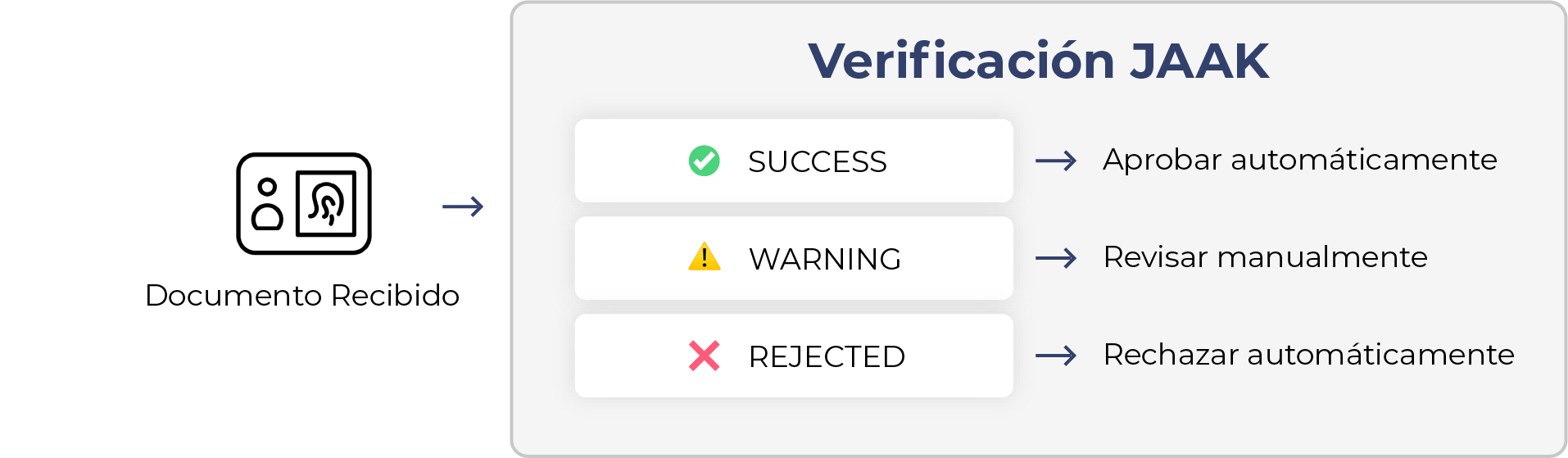
Threshold Setup
| Case of Use | Recommended Configure |
|---|---|
| Basic | Only SUCCESS approved |
| Strict Verification | SUCCESS + Government Verification |
| Manual Review | WARNING → Review Cola |
Security considerations
Data Protection
API Kys
- Never explain API front code keys
- Use environment variables
- Regular rotary keys
- Access restricted by IP (optional)
Sensitive data
- Transmission by HTTPS
- Do not store images without encryption
- Logs without personal information
- GDPR / CCPA compliance
Rate Limiting
- Implement client boundaries
- Drive answers 429 (Too Many Requests)
- Using exponential backoff
Support and Contact
When To Contact Support
- Undocumented errors in this guide
- Persistent performance challenges
- Special configuration required
- Doubts about integration
Contact information
Email: support
Information to be included:
- Special description of the problem
- Error code (if applicable)
- Failed request
- Steps to Replay The Problem
- Configure used
Additional
Ready to get started!
With this guide you have everything necessary to implement JAAK Document Verify in your product. Start with a basic check and gradually add advanced functionality as required.
Do you need additional help? Do not hesitate to contact our support team.